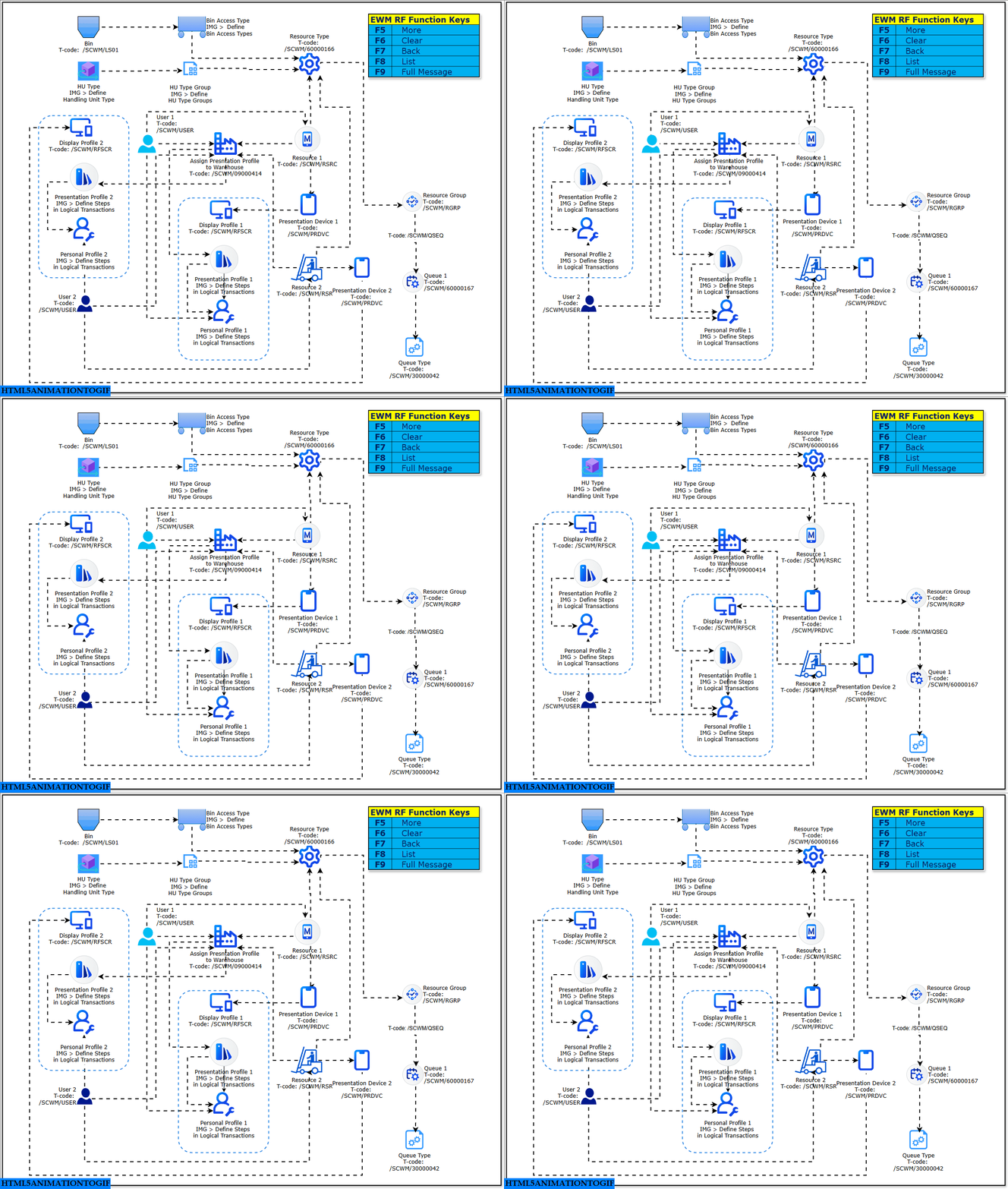
This visual illustrates the end-to-end configuration flow for SAP Extended Warehouse Management (EWM) Resource Management with a strong focus on RF framework setup. The diagram explains how master data, user profiles, presentation profiles, resources, queues, and RF function keys are logically connected to deliver a consistent and simplified RF execution experience in warehouse operations. From this flow, a reader can understand how RF devices, users, and warehouse resources are technically linked and controlled in SAP EWM to support efficient execution on the warehouse floor.
The diagram mainly serves functional consultants and warehouse process designers who configure or troubleshoot RF-driven warehouse activities.
Process Flow Description
The flow can be read from left to right and top to bottom, starting with structural definitions and ending with operational execution on RF devices.
1. Structural Master Data Setup
At the top of the flow, core warehouse master data objects are defined:
- Bin Access Type
Bin access types determine how warehouse bins can be accessed and navigated during RF transactions. These settings influence path determination and bin selection logic. - Handling Unit Type and HU Type Group
Handling Unit types are grouped to control how packaging units behave in RF processes. HU type groups are later referenced by resources and processes. - Resource Type
Resource types define the technical and operational capabilities of warehouse resources such as forklifts or manual picking carts. This acts as a template for individual resources.
These objects form the foundation for how warehouse execution will be structured.
2. User and Profile Configuration
In the central part of the diagram, user-related configuration is shown:
- User Assignment
Warehouse users are maintained and assigned relevant profiles. Each user represents a person or logical operator executing tasks in EWM. - Personal Profile
The personal profile defines individual preferences for RF usage, such as step sequence behavior within logical transactions. - Presentation Profile
Presentation profiles control the RF screen layout, field sequence, and screen flow. They define how information is displayed on RF devices. - Display Profile
Display profiles determine visual aspects such as field visibility and formatting on RF screens.
Together, these profiles define the RF user experience. The diagram shows that personal, presentation, and display profiles are logically connected and assigned at user level.
3. Logical Transaction Control
The diagram highlights configuration for logical transactions:
- Define Steps in Logical Transactions
Both personal and presentation profiles reference logical transaction steps. This controls which RF screens appear and in what order during execution.
This ensures that RF flows are standardized while still allowing user-specific flexibility.
4. Resource and Device Assignment
On the right side of the flow, operational execution elements are configured:
- Resource
A resource represents a physical or logical warehouse worker or equipment. Each resource is created based on a resource type. - Presentation Device
Presentation devices represent RF handhelds or terminals. Resources are assigned to presentation devices so that the correct RF layout is triggered during login.
This linkage ensures that when a user logs in with a specific resource and device, the correct RF configuration is applied automatically.
5. Resource Groups and Queue Management
The lower-right section shows workload distribution logic:
- Resource Group
Resources are grouped to allow collective task assignment and workload balancing. - Queue Type and Queue
Queue types define the nature of warehouse tasks, while queues represent actual task containers. Queues are assigned to resource groups to control who can process which warehouse tasks.
This setup drives task allocation in EWM and directly affects execution efficiency.
6. RF Function Keys
The diagram also highlights RF function keys:
- F5 – More
- F6 – Clear
- F7 – Back
- F8 – List
- F9 – Full Message
These keys are part of the RF framework and are available across RF transactions, providing consistent navigation and control for warehouse users.
Key Takeaways
- The flow shows a clear separation between structural master data, user experience configuration, and operational execution.
- RF behavior in SAP EWM is controlled through layered profiles rather than hard-coded logic.
- Resources act as the central execution object, linking users, devices, queues, and warehouse tasks.
- Proper alignment of profiles, resources, and queues is essential for stable and efficient RF operations.
This diagram provides a compact but complete view of how SAP EWM Resource Management and RF configuration fit together into one coherent execution model.