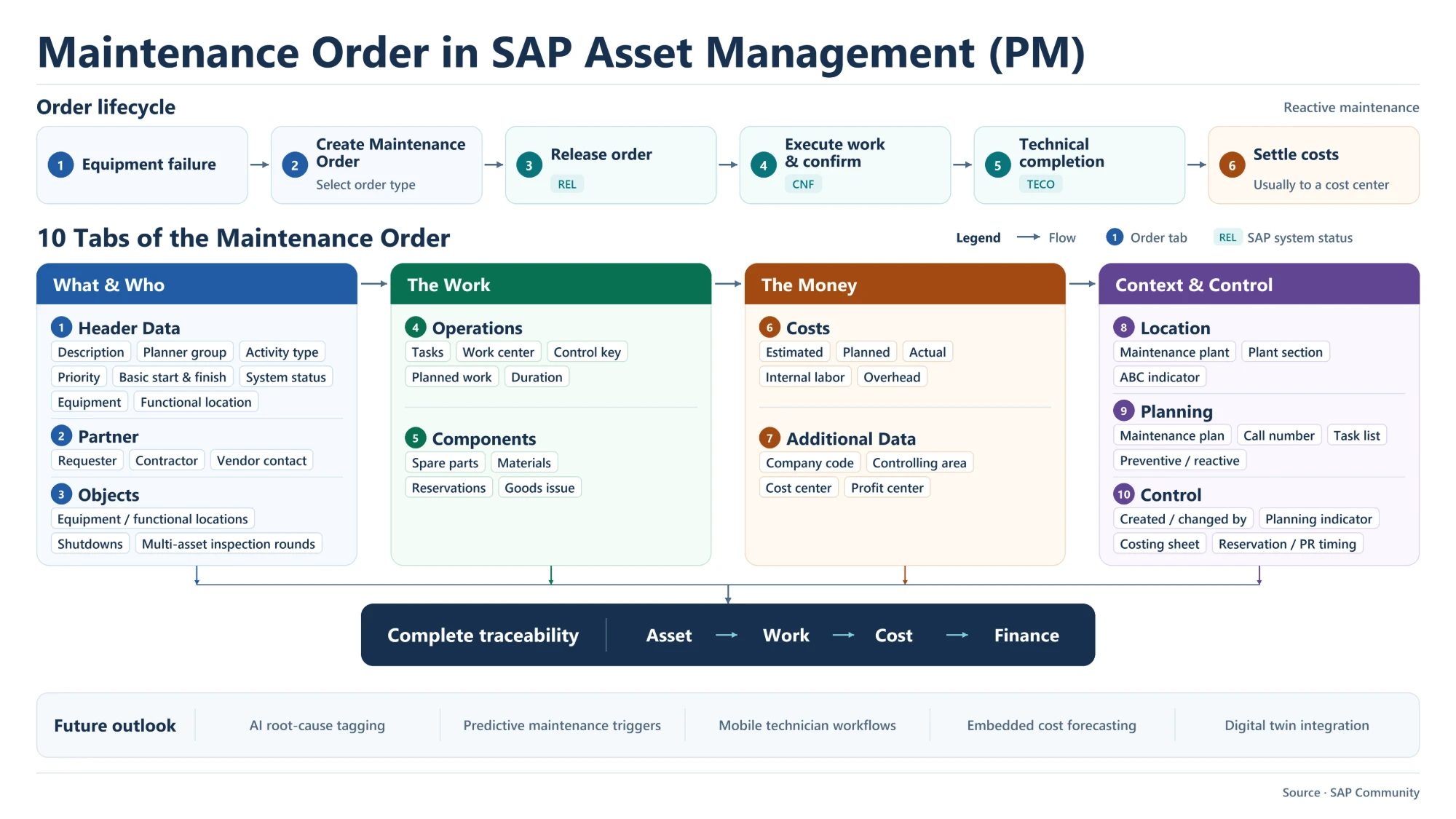
The SAP PM maintenance order is the central document of SAP Asset Management: it records what is repaired, who does the work, which materials are used and what it costs. This overview covers the order lifecycle in a reactive maintenance case and the ten tabs that hold the order’s data.
Maintenance Order Lifecycle in Reactive Maintenance
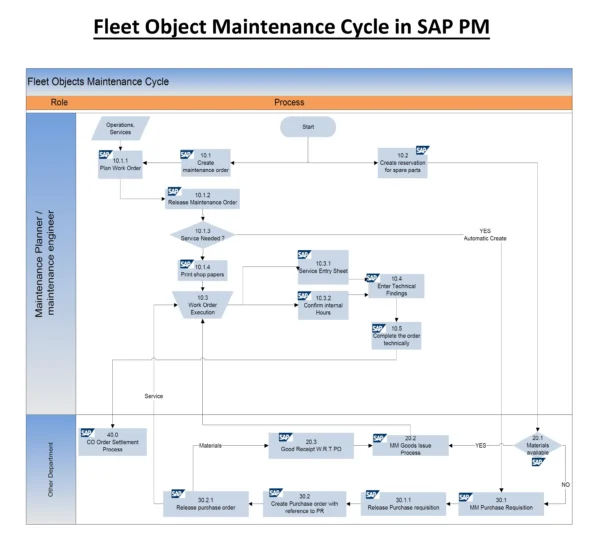
A reactive (breakdown) maintenance order moves through six steps:
- Equipment failure: a breakdown triggers the need for maintenance.
- Create the maintenance order: the planner selects the order type and enters the order.
- Release the order (system status REL): the work can start and materials can be issued.
- Execute and confirm the work (status CNF): technicians confirm time and progress on the operations.
- Technical completion (status TECO): the work is finished from a technical point of view.
- Settle costs: the collected costs are settled, usually to a cost center.
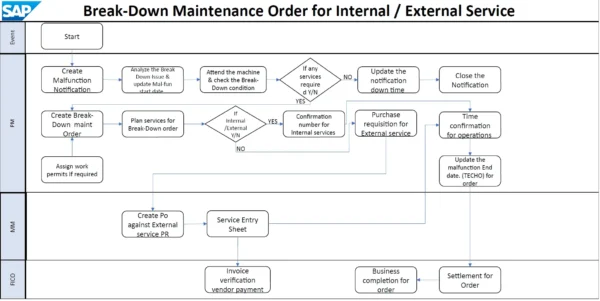
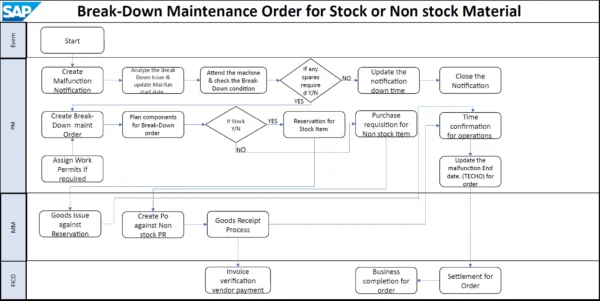
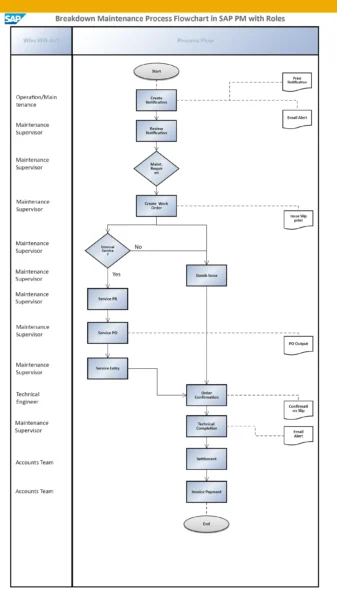
For a step-by-step view of the breakdown process, see SAP Corrective and Breakdown Maintenance Process Flow. The full order cycle is also covered in SAP PM Maintenance Work Order Cycle.
The 10 Tabs of the Maintenance Order
The order’s data is spread across ten tabs. They fall into four groups: what and who, the work, the money, and context and control.
What and Who: Header Data, Partner and Objects
- Header data: description, planner group, maintenance activity type, priority, basic start and finish dates, system status, and the equipment or functional location being maintained.
- Partner: the people and parties involved, such as the requester, a contractor or a vendor contact.
- Objects: additional equipment or functional locations, used for shutdowns or inspection rounds that cover several assets in one order.
The Work: Operations and Components
- Operations: the tasks to perform, each with a work center, control key, planned work and duration.
- Components: the spare parts and materials needed, with their reservations and goods issues. See Stock Material Issuance over Maintenance Order for how stock materials are issued to the order.
The Money: Costs and Additional Data
- Costs: estimated, planned and actual costs, broken down into items such as internal labor and overhead.
- Additional data: the financial assignment of the order: company code, controlling area, cost center and profit center.
Context and Control: Location, Planning and Control
- Location: maintenance plant, plant section and ABC indicator of the asset.
- Planning: the link to a maintenance plan, call number and task list, and whether the order is preventive or reactive. Preventive orders generated from plans are covered in Preventive Maintenance Process Flowchart in SAP PM.
- Control: created by and changed by, planning indicator, costing sheet and the timing of reservations and purchase requisitions.
Traceability from Asset to Finance
Because one document carries the asset, the work, the cost and the financial assignment, the maintenance order gives complete traceability: Asset → Work → Cost → Finance. Maintenance history, labor and material use, and the cost center or profit center charge can all be followed back to the same order.
Future Outlook for Maintenance Orders
Developments expected to shape maintenance orders include AI-based root-cause tagging, predictive maintenance triggers, mobile technician workflows, embedded cost forecasting and digital twin integration.
Maintenance Order Tabs at a Glance
| Group | Tab | Typical fields |
|---|---|---|
| What & who | 1 Header Data | Description, planner group, activity type, priority, basic dates, system status, equipment, functional location |
| What & who | 2 Partner | Requester, contractor, vendor contact |
| What & who | 3 Objects | Equipment / functional locations, shutdowns, multi-asset inspection rounds |
| The work | 4 Operations | Tasks, work center, control key, planned work, duration |
| The work | 5 Components | Spare parts, materials, reservations, goods issue |
| The money | 6 Costs | Estimated, planned, actual, internal labor, overhead |
| The money | 7 Additional Data | Company code, controlling area, cost center, profit center |
| Context & control | 8 Location | Maintenance plant, plant section, ABC indicator |
| Context & control | 9 Planning | Maintenance plan, call number, task list, preventive / reactive |
| Context & control | 10 Control | Created / changed by, planning indicator, costing sheet, reservation / PR timing |
Additional SAP Notes (Not Shown in the Diagram)
These points are general SAP knowledge added for context, not part of the original image:
- Maintenance orders are created with IW31, changed with IW32 and displayed with IW33; time confirmations are commonly entered with IW41.
- Before release, a new order has the system status CRTD (created).
- Order settlement is run individually with KO88 or collectively with KO8G.
Key Takeaways
- A reactive maintenance order runs from failure through creation, release (REL), confirmation (CNF) and technical completion (TECO) to cost settlement.
- Ten tabs hold the order data, grouped into what and who, the work, the money, and context and control.
- Operations and components describe the work; costs and additional data describe what it costs and where it is charged.
- Costs are usually settled to a cost center, which links maintenance work to Finance.