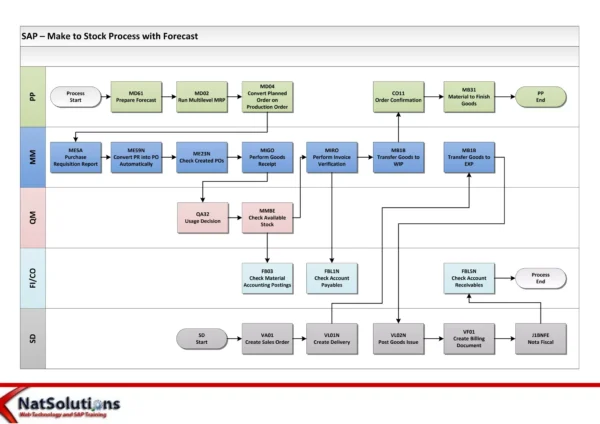
This flowchart, prepared by Abul Hasnat, illustrates the end-to-end process for a “Make-to-Stock” (MTS) scenario in SAP Production Planning (PP). An MTS strategy is a production method where finished goods are produced in anticipation of customer demand and stored in inventory until they are sold.
The flowchart outlines the steps involved in this process, which can be broadly categorized into four phases: Planning, Production Execution, Warehouse Management, and Sales & Distribution.
Production Planning Phase
The planning phase prepares the demand forecast and the master data (material, BOM, routing) that MRP needs in order to plan procurement and production.
Sales Forecast
This step involves creating a forecast to predict future customer demand for finished goods. The forecast is used in the Material Requirements Planning (MRP) stage to determine which raw materials need to be ordered and when.
Planned Independent Requirement (PIR) – MD61
A Planned Independent Requirement (PIR) is a forecast item in SAP that represents the anticipated demand for a finished good over a certain period. PIRs are created in SAP Demand Management (PP) using transaction code MD61.
Create Material Master – MM01
The bill of materials (BOM) and routing information are linked to a material master record in the MM module. The material master record contains all the information about a material, including its physical characteristics, inventory control data, and purchasing information. Transaction code MM01 is used to create a material master record.
Create BOM – CS01
The bill of materials (BOM) is a list of all the raw materials, sub-assemblies, and components required to produce a finished good. It specifies the quantity of each item needed and the units of measure. Transaction code CS01 is used to create a BOM in SAP.
Create Routing – CA01
The routing defines the sequence of operations needed to produce a finished good. It also specifies the work centers or machines required for each operation, the standard times allowed for each operation, and any special tools or materials needed. Transaction code CA01 is used to create a routing in SAP.
Create Version
A version is a snapshot of a routing or BOM at a specific point in time. Versions are used to control changes to routings and BOMs. When a routing or BOM is changed, a new version is created.
Run MRP
Material Requirements Planning (MRP) is a process used to determine the requirements for raw materials, sub-assemblies, and components needed to produce finished goods. MRP takes into account the sales forecast, the BOM, and the routing, as well as current inventory levels and lead times. MRP is typically run periodically in SAP, but it can also be run manually.
Production Execution Phase
In this phase, the planned orders created by MRP become production orders that are released and confirmed on the shop floor.
Planned Order Converted to Production Order – CO01
When MRP is run, it creates planned orders for the materials that are required. A planned order is a preliminary document that represents the demand for a material. Planned orders can be converted into production orders, which authorize the production of a finished good. Transaction code CO01 creates a production order directly; an existing planned order can be converted with MD04 or CO40.
Production Order Release – CO02
Before a production order can be started, it must be released. The release process checks that all of the materials required for the production order are available in inventory. Transaction code CO02 is used to release a production order in SAP.
Confirmation of Production Order – CO11N
The confirmation process records the actual production output and updates the inventory levels of the finished goods and raw materials. Transaction code CO11N is used to confirm a production order in SAP.
Warehouse Management Phase
Goods Stored in Warehouse
After the finished goods have been produced, they are transferred to a warehouse for storage. The warehouse management system in SAP keeps track of the quantity and location of all materials in the warehouse.
Cost Update – CK40N
This step may involve updating the cost of the finished goods in the warehouse. There are a number of ways to do this in SAP, such as using a costing variant or a material valuation process.
Sales and Distribution Phase
Outbound Delivery and Goods Issue (PGI) – VL01N
When a customer places a sales order for a finished good, an outbound delivery document is created in the Sales & Distribution (SD) module of SAP. The outbound delivery document is used to pick the finished goods from the warehouse and deliver them to the customer. The picking process is confirmed by a goods issue (GI) document.
Billing – VF01
After the finished goods have been delivered to the customer, a billing document is created in the SD module to invoice the customer for the delivered goods.
Transaction Codes in the MTS Process at a Glance
| Phase | Step | T-code |
|---|---|---|
| Planning | Create Planned Independent Requirement | MD61 |
| Planning | Create Material Master | MM01 |
| Planning | Create BOM | CS01 |
| Planning | Create Routing | CA01 |
| Production Execution | Create Production Order | CO01 |
| Production Execution | Release Production Order | CO02 |
| Production Execution | Confirm Production Order | CO11N |
| Warehouse Management | Cost Update | CK40N |
| Sales & Distribution | Outbound Delivery and PGI | VL01N |
| Sales & Distribution | Billing | VF01 |
Key Takeaways
- In Make-to-Stock, production is driven by a forecast (PIR), not by individual customer orders.
- Material master, BOM, and routing must exist before MRP can create planned orders that become production orders.
- Finished goods go to stock first; delivery (VL01N) and billing (VF01) happen later, when a customer order arrives.