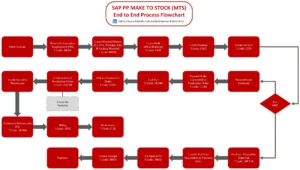
The flowchart depicts the SAP Make-to-Stock (MTS) Process with Forecast, detailing how production and sales orders are handled across different SAP modules, including PP (Production Planning), MM (Materials Management), QM (Quality Management), FI/CO (Financial Accounting and Controlling), and SD (Sales and Distribution). Below is a breakdown of the key process steps with transaction codes (t-codes) in SAP:
🏭 Production Planning Cycle (SAP PP):
- The process begins with preparing a forecast (MD61).
- This forecast is used to run a multi-level MRP (Material Requirements Planning) (MD02) to determine the required production orders.
- Planned orders are converted into production orders (MD04).
- Once a sales order is confirmed (CO11), material is procured and finished goods are created (MB31).
📦 Procurement and Inventory Management (SAP MM)
- Purchase requisitions are generated (ME5A).
- These requisitions are automatically converted into purchase orders (ME59N).
- Created purchase orders are checked (ME23N).
- Goods are received (MIGO) and verified (MIRO).
- Materials are transferred to work in progress (WIP) (MB1B).
🔍 Quality Inspection (SAP QM)
- Usage decisions are made (QA32), and available stock is checked (MMBE).
💰 Financial Postings (SAP FICO)
- Material accounting postings are checked (FB03).
- Account payables are checked (FBL1N).
- Account receivables are checked (FBL5N).
🚚 Order Fulfillment (SAP SD)
- Sales orders are created (VA01).
- Deliveries are created (VL01N).
- Goods are issued (VL02N).
- Billing documents are created (VF01).
- Nota Fiscal documents are created (J1BNFE).
Process Flow Summary:
- PP Module: Forecasting, MRP run, production orders, and goods receipt.
- MM Module: Purchase requisition, order conversion, goods receipt, and stock transfers.
- QM Module: Quality inspection and stock verification.
- FI/CO Module: Accounting verification for material movements and payments.
- SD Module: Sales order processing, delivery, goods issue, billing, and electronic invoicing.
This flowchart illustrates how various SAP modules integrate to manage the Make-to-Stock process efficiently, ensuring that materials are produced, quality-checked, and delivered based on customer orders while maintaining accurate financial records.