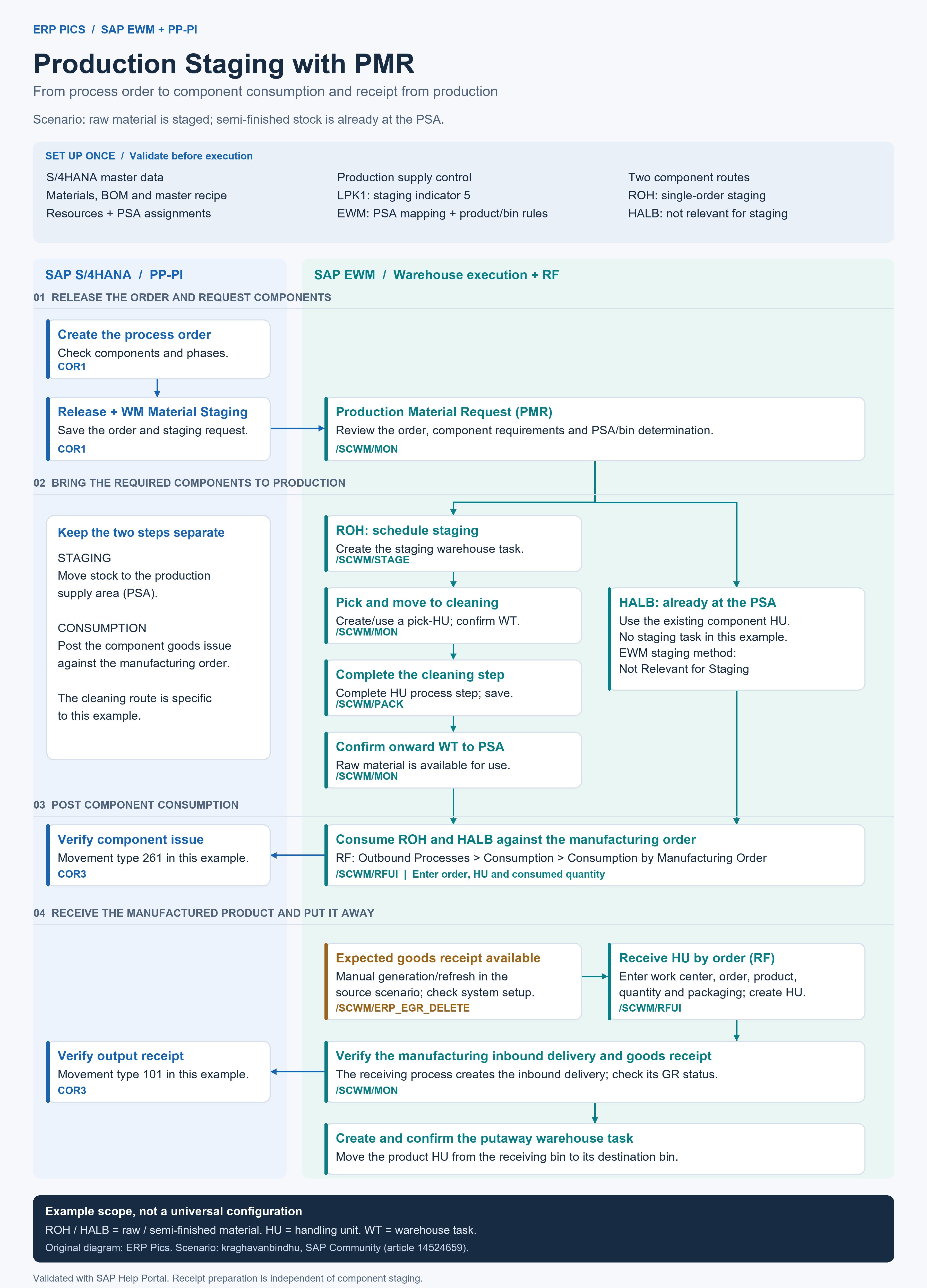
SAP EWM production staging with a production material request (PMR) connects a manufacturing order to component supply and consumption. This process-order example also covers the separate receipt of the manufactured product, from RF handling-unit creation to putaway.
PMR-Based Production Supply and Master Data
Advanced production integration supports production orders and process orders. Production creates the manufacturing order; EWM executes staging, consumption and receipt. The SAP advanced production integration documentation describes the overall separation of responsibilities.
Before execution, align materials and warehouse products, the production supply areas (PSAs), control cycles, resource assignments and component-to-phase assignments in the master recipe. The S/4HANA control cycle uses staging indicator 5 — EWM Staging; EWM determines the staging method and PSA bin at product level.
The example uses raw material 10000243, semi-finished component 10000242 and manufactured product 10000241. These identifiers, warehouse numbers, PSA names and storage bins are example values, not SAP defaults. The output is called a manufactured product because the source uses inconsistent FERT/HALB labels.
| Component route | EWM staging rule | Execution |
|---|---|---|
| Raw material (ROH) | Single-Order Staging | Create and confirm staging tasks before consumption. |
| Semi-finished component (HALB) | Not Relevant for Staging | Consume existing stock at the PSA; no staging task in this example. |
Create the Process Order and Send the PMR
Create and Release the Process Order (COR1)
Create the process order in COR1, check the quantity and dates, and review the component assignments. Release the order, trigger WM Material Staging and save. WM material staging sends the component requirements to EWM as a PMR; releasing the order alone should not be confused with performing staging.
Check the Production Material Request (/SCWM/MON)
Open the manufacturing order in the Production Material Request node of /SCWM/MON. Check the required products, quantities and PSA/bin determination before creating warehouse tasks. The PMR represents the manufacturing order in EWM and is updated when relevant order information changes in the production system.
For the broader planning and manufacturing sequence, see the SAP Make-to-Stock Process Flow.
Stage Raw Material and Consume the Components
Schedule Staging and Confirm the Pick (/SCWM/STAGE)
Use /SCWM/STAGE to create staging warehouse tasks for the relevant order and staging horizon. Review the proposed quantity, then execute the warehouse movement and confirm the task. SAP documents the PMR-based task-creation options in its overview of staging methods.
Complete the Example Cleaning Route (/SCWM/PACK)
In this scenario, the raw-material HU passes through a cleaning area. After the pick is confirmed, complete the HU process step in /SCWM/PACK, save, and confirm the onward warehouse task to the PSA. This intermediate cleaning operation is scenario-specific; it is not a mandatory step in every production-staging design.
Use the Semi-Finished Stock Already at the PSA
The semi-finished component uses an existing PSA HU. Its EWM staging method is Not Relevant for Staging, so it bypasses the raw-material staging route. The S/4HANA control-cycle indicator and the EWM product staging method are separate settings.
Post Consumption by Manufacturing Order (/SCWM/RFUI)
In RF, choose Outbound Processes → Consumption → Consumption by Manufacturing Order. Enter the manufacturing order and the component HU, then confirm the actual consumed quantity. Process both component routes against the same order. Staging makes stock available; consumption records its issue to production.
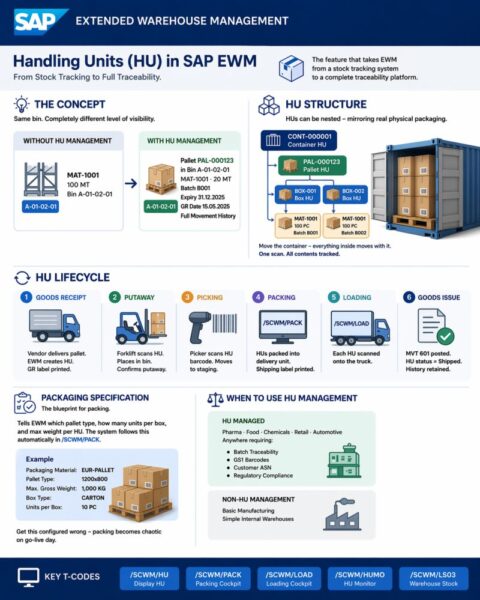
Consumption updates the PMR and communicates the goods issue to the production system. For the document relationship, see SAP staging and consumption for production. The Handling Units in SAP EWM process explains the packaging objects used during execution.
Receive the Manufactured Product and Confirm Putaway
Ensure the Expected Goods Receipt Is Available
The decentralized receiving scenario requires an expected goods receipt (EGR) for the manufacturing order. The source manually refreshes it using /SCWM/ERP_EGR_DELETE. Despite its name, the transaction supports creation as well as deletion. Receipt preparation is separate from the PMR used to supply components.
Receive a Handling Unit by Order (/SCWM/RFUI)
Choose Inbound Processes → Receiving of Handling Units → Rec. HU by Manufacturing Order → Rec. HU by Order. Log on to the receiving work center, enter the order, select the manufactured product, and check quantity and batch data. Maintain the packaging material and HU type, then create/receive the HU.
The RF receiving functions allow changes to packaging, quantity and dates before HU receipt. The system creates the manufacturing inbound delivery during receipt of the HU. Refer to SAP receipt of handling units from production using RF for the prerequisites and supported receiving variants.
Verify Goods Receipt and Confirm the Putaway Task
Check the manufacturing inbound delivery and its goods-receipt status in /SCWM/MON. Create the putaway warehouse task from the delivery, confirm the destination bin, and confirm the task. Goods receipt and putaway confirmation are distinct checks. The example places the received product into a production-area bin; the destination is configuration-dependent.
Check Goods Movements and Integration Errors
In COR3, open Goto → Lists → Documented Goods Movements and reconcile the consumed components and received product against the process order. The example has the following movement types:
| Event | Movement type | Reconciliation |
|---|---|---|
| Component consumption | 261 | ROH and HALB issues against the process order. |
| Manufactured-product receipt | 101 | Receipt of the output product against the process order. |
If an expected update is missing between systems, inspect the inbound qRFC queue in SMQ2 in the receiving system. Open the failed entry and its application error; investigate the underlying problem before reprocessing. The source demonstrates queue diagnosis, not a universal error correction.
SAP Transactions Used in This Process
| Transaction | Purpose | Scope |
|---|---|---|
| MM01 / BD10 | Material creation / material distribution | Preparation in the source landscape; distribution depends on the integration setup. |
| /SCWM/MAT1 | Maintain warehouse products | Warehouse product data. |
| PK05 / /SCWM/PSA / /SCWM/PSAMAP | Maintain and map production supply areas | S/4HANA and EWM PSA alignment. |
| LPK1 / /SCWM/PSASTAGE | Maintain control cycles and PSA bin/staging assignments | S/4HANA indicator 5 is distinct from the EWM staging method. |
| CRC2 / C202 | Maintain resource and master recipe | PSA and component/phase assignments for the process order. |
| COR1 | Create the process order | Release and trigger WM material staging. |
| /SCWM/MON | Warehouse Management Monitor | PMR, warehouse tasks, stock and inbound deliveries. |
| /SCWM/STAGE | Schedule staging for production | Create staging tasks for the PMR. |
| /SCWM/PACK | Work-center processing | Complete the example HU cleaning step. |
| /SCWM/RFUI | RF execution | Consumption and receipt by manufacturing order. |
| /SCWM/ERP_EGR_DELETE | Generate or delete expected goods receipts | Manual EGR preparation/refresh when required. |
| COR3 / SMQ2 | Display order / monitor inbound qRFC | Goods-movement reconciliation / integration diagnosis. |
Implementation Notes and Sources
Additional SAP clarification: a manual EGR refresh is not required for every deployment or every order. Where manual creation is needed, SAP documents the Only Create program mode in Generate Expected Goods Receipt Documents in SAP EWM. The source example selects Delete and Create; choose the mode according to the intended operation rather than copying the example selection.
This original ERP Pics process flow is based on EWM Staging User Manual for production by kraghavanbindhu. The scenario and screen examples come from that SAP Community article; PMR behavior, staging options and RF receiving were cross-checked against the linked SAP Help documentation. The scope ends after putaway verification; manufacturing-order closure and PSA clearance are separate follow-on activities.
Key Takeaways
- Use the PMR to coordinate component requirements between the manufacturing order and EWM.
- Distinguish raw-material staging from direct consumption of stock already at the PSA.
- Treat cleaning, bin names and material numbers as example-specific configuration.
- Keep component consumption, output goods receipt and putaway confirmation separate.
- Reconcile the EWM execution with the documented goods movements in S/4HANA.