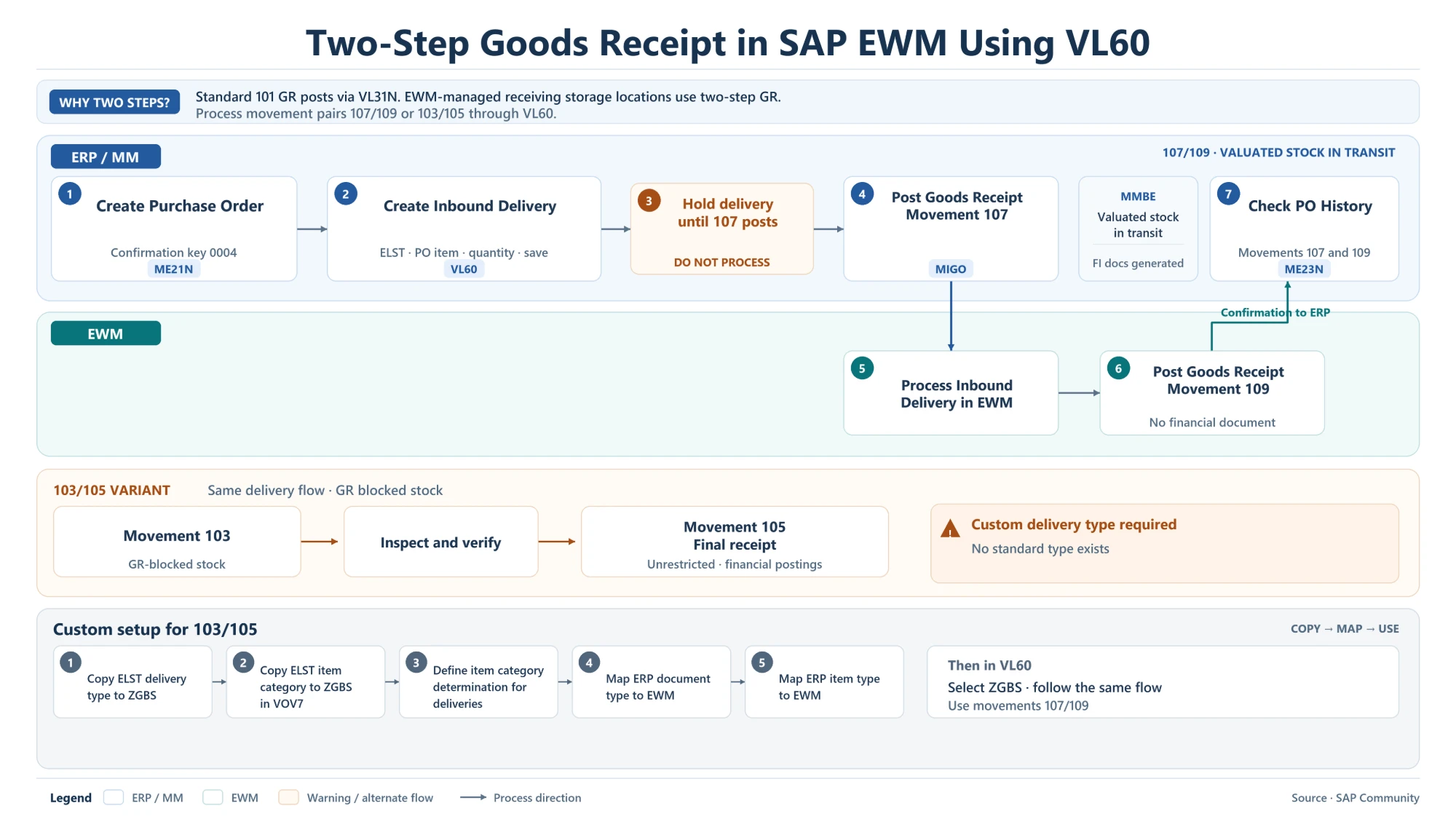
Two-step goods receipt in SAP EWM using VL60 splits a purchase order receipt into two postings when the receiving storage location is managed by EWM. The movement type pairs 107/109 and 103/105 are processed with an inbound delivery created in VL60, while the standard one-step receipt (movement type 101) still runs through VL31N.
Why a Two-Step Goods Receipt Is Needed with EWM
In a classic Inventory Management storage location, both two-step variants can be posted directly in MIGO. When the storage location is EWM-managed, the goods receipt has to pass through an inbound delivery that EWM processes, so the two steps are split between ERP and EWM:
- 107/109: the first step records the stock as valuated stock in transit, so the vendor can be paid before the goods arrive; the second step confirms the receipt in the warehouse.
- 103/105: the first step receives the goods as GR blocked stock for inspection; the second step is the final receipt into unrestricted stock, where the financial postings happen.
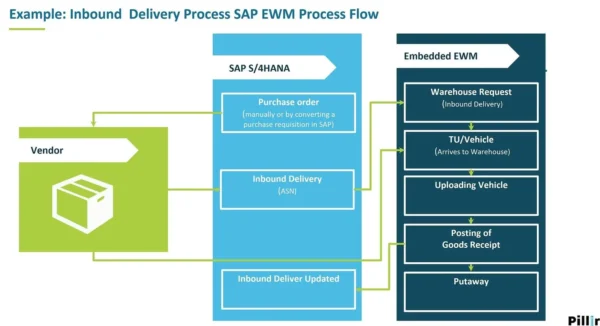
For the standard EWM inbound flow with movement type 101, see SAP EWM Inbound Delivery Process.
107/109 Process: Valuated Stock in Transit
Step 1: Create the Purchase Order (ME21N)
The purchase order is created in ME21N with confirmation control key 0004.
Step 2: Create the Inbound Delivery (VL60)
An inbound delivery for the 109 step is created in VL60 with delivery type ELST, referencing the purchase order item and quantity.
Step 3: Hold the Delivery Until 107 Is Posted
The inbound delivery must not be processed yet. The 107 posting has to come first.
Step 4: Post Goods Receipt with Movement Type 107 (MIGO)
The goods receipt is posted against the purchase order in MIGO with movement type 107. Accounting documents are created, and MMBE shows the quantity as valuated stock in transit.
Steps 5–6: Process the Inbound Delivery in EWM (Movement Type 109)
EWM now processes the inbound delivery and posts the goods receipt, which reaches ERP as movement type 109. This step creates no financial document, because the value was already posted with 107.
Step 7: Check the PO History (ME23N)
After EWM confirms the receipt to ERP, the purchase order history in ME23N shows both movements, 107 and 109.
103/105 Variant: GR Blocked Stock for Inspection
The 103/105 variant follows the same delivery flow, but the stock is received as GR blocked stock first:
- Movement type 103: goods are received into GR blocked stock.
- Inspect and verify the goods while they are blocked.
- Movement type 105: final receipt into unrestricted stock, with the financial postings.
There is no standard delivery type for this variant, so a custom one is needed. For goods receipt with inspection more generally, see Goods Receipt Inspection Process in SAP.
Custom Setup for 103/105 (Delivery Type ZGBS)
- Copy delivery type ELST to a custom type, for example ZGBS.
- Copy the ELST item category to ZGBS (VOV7).
- Define item category determination for the new delivery type.
- Map the ERP delivery document type to an EWM document type.
- Map the ERP item type to an EWM item type.
After this setup, ZGBS is selected in VL60 and the process follows the same steps as 107/109.
Two-Step Goods Receipt Movement Types and T-Codes
| Movement / T-code | Purpose | Financial posting |
|---|---|---|
| 101 (VL31N) | Standard one-step goods receipt via inbound delivery | Yes |
| 107 (MIGO) | First step: valuated stock in transit | Yes |
| 109 (EWM via VL60 delivery) | Second step: receipt confirmed in the warehouse | No |
| 103 | First step: GR blocked stock | No |
| 105 | Final receipt into unrestricted stock | Yes |
| ME21N | Purchase order with confirmation control key 0004 | — |
| VL60 | Create the inbound delivery (ELST or custom ZGBS) | — |
| MMBE | Check valuated stock in transit after 107 | — |
| ME23N | Check PO history for both movements | — |
Additional SAP Notes (Not Shown in the Diagram)
This point is general SAP knowledge added for context, not part of the original image:
- GR blocked stock posted with movement type 103 is not valuated, which is why the value is only posted at the final receipt with 105. The general goods receipt process is covered in SAP Goods Receipt Process Flowchart.
Key Takeaways
- EWM-managed storage locations need an inbound delivery for two-step goods receipt; VL60 creates it.
- In 107/109, post 107 in MIGO first, then process the VL60 delivery in EWM for 109.
- 107 creates the accounting documents; 109 creates no financial document.
- 103/105 follows the same flow but needs a custom delivery type such as ZGBS with ERP-to-EWM mapping.
- The PO history in ME23N shows both movements once EWM has confirmed the receipt.