Kit-to-Stock in SAP EWM with SAP PP integration builds kits from several components in advance and keeps them in warehouse stock, ready for future sales orders. A production order in ERP starts the process, and SAP EWM picks the components, assembles the kit at a value-added services (VAS) work center and puts the finished kit away.
What Kit-to-Stock Means in a Decentralized EWM Setup
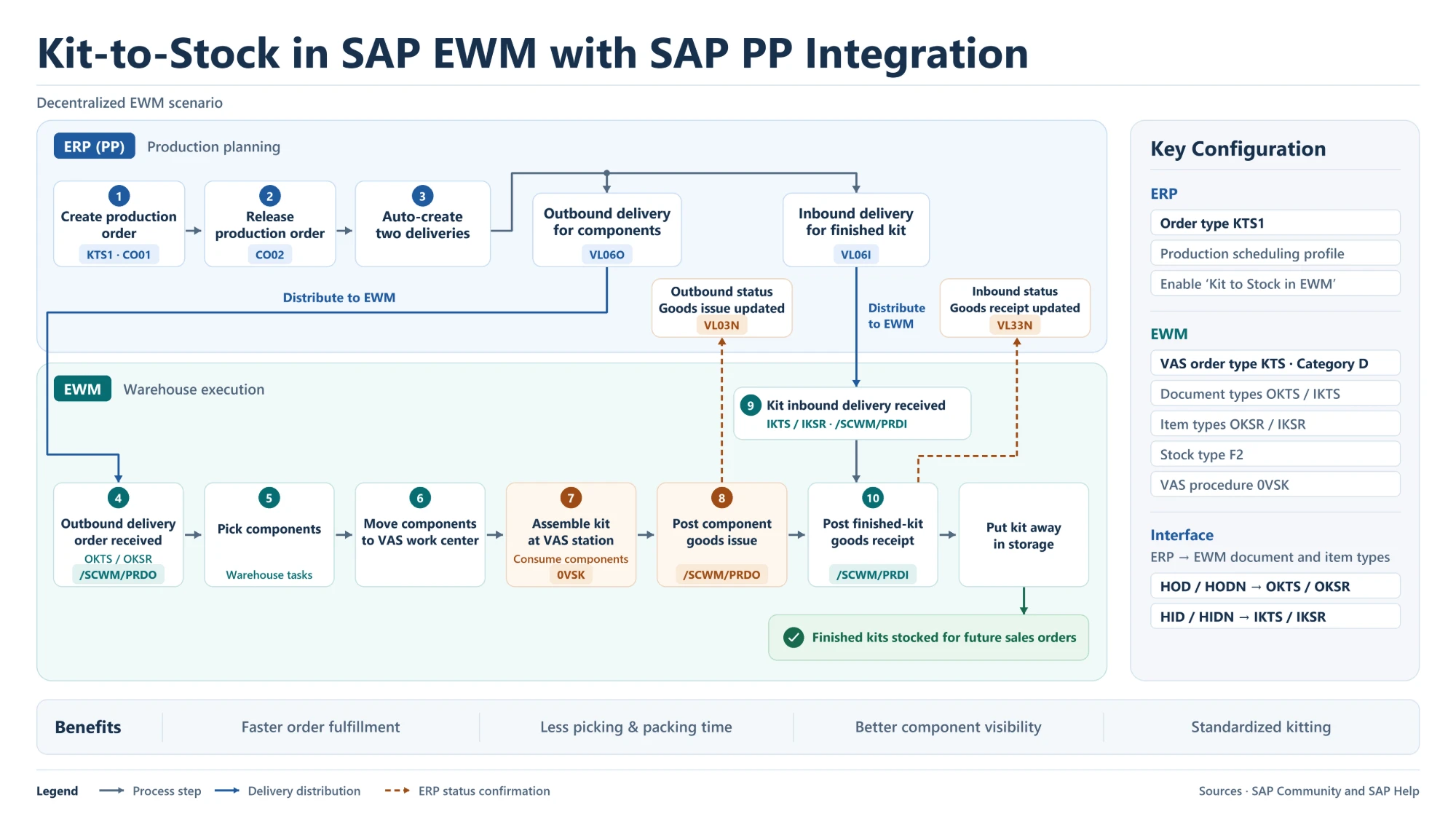
Kits are built for expected demand, not for a specific customer order. In a decentralized scenario, production planning runs in the ERP system (SAP ECC or SAP S/4HANA) and warehouse execution runs in a separate SAP EWM system. Releasing the production order creates two deliveries: an outbound delivery for the components and an inbound delivery for the finished kit. Both are distributed to EWM, and EWM reports goods issue and goods receipt back to ERP.
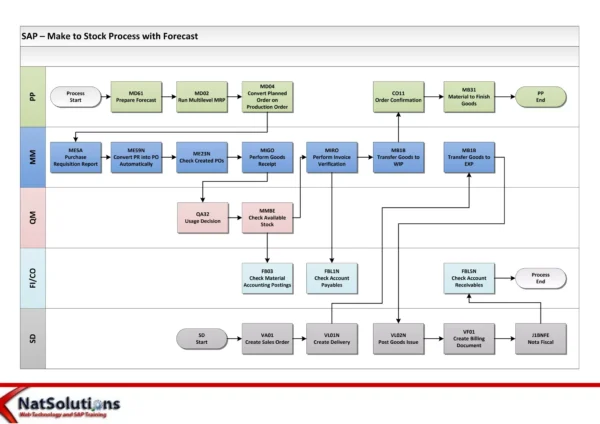
This overview covers the process steps and the key settings. Since the kit is produced to stock, the planning side is similar to make-to-stock production; see SAP Make-to-Stock Process Flow Diagram.
Production Order and Deliveries in ERP (PP)
Steps 1–2: Create and Release the Production Order (CO01, CO02)
The production order is created with the Kit-to-Stock order type KTS1 in CO01 and released in CO02.
Step 3: Two Deliveries Are Created Automatically
Release triggers two deliveries, which are distributed to EWM:
- an outbound delivery for the components (monitored in VL06O), used to pick and consume the components;
- an inbound delivery for the finished kit (monitored in VL06I), used to receive the kit into stock.
Component Picking and Kit Assembly in EWM
Step 4: Outbound Delivery Order Received (OKTS / OKSR)
The component delivery arrives in EWM as an outbound delivery order with document type OKTS and item type OKSR, processed in /SCWM/PRDO.
Steps 5–6: Pick Components and Move Them to the VAS Work Center
Warehouse tasks pick the components and move them to the VAS work center where the kit is built.
Step 7: Assemble the Kit at the VAS Station
The kit is assembled and the components are consumed. VAS procedure 0VSK controls the kitting activities.
Step 8: Post Component Goods Issue
The goods issue for the components is posted in /SCWM/PRDO. ERP receives the status update, and the outbound delivery shows the goods issue in VL03N.
Finished-Kit Goods Receipt and Putaway
Step 9: Kit Inbound Delivery Received (IKTS / IKSR)
The finished-kit delivery arrives in EWM as an inbound delivery with document type IKTS and item type IKSR, processed in /SCWM/PRDI.
Step 10: Post Finished-Kit Goods Receipt and Put Away
The goods receipt for the kit is posted in /SCWM/PRDI, and ERP shows the goods receipt on the inbound delivery in VL33N. The kit is then put away and stays in stock for future sales orders.
The standard EWM delivery flows behind these steps are covered in SAP EWM Outbound Delivery Process Flow Diagram and SAP EWM Inbound Delivery Process.
Kit-to-Stock Key Configuration
| System | Setting | Value / purpose |
|---|---|---|
| ERP | Production order type | KTS1 (Kit to Stock) |
| ERP | Production scheduling profile | “Kit to Stock in EWM” indicator, so release creates the two deliveries |
| EWM | VAS order type | KTS, category D (VAS for creating kits for stock) |
| EWM | Document types | OKTS (components) / IKTS (finished kit) |
| EWM | Item types | OKSR / IKSR |
| EWM | Stock type | F2 |
| EWM | VAS procedure | 0VSK |
| Interface | Outbound mapping | ERP HOD / HODN → EWM OKTS / OKSR |
| Interface | Inbound mapping | ERP HID / HIDN → EWM IKTS / IKSR |
Kit-to-Stock T-Codes
| T-code | System | Used for |
|---|---|---|
| CO01 / CO02 | ERP | Create and release the KTS1 production order |
| VL06O / VL06I | ERP | Monitor the component outbound delivery and the kit inbound delivery |
| /SCWM/PRDO | EWM | Outbound delivery order for components, goods issue |
| /SCWM/PRDI | EWM | Inbound delivery for the kit, goods receipt |
| VL03N / VL33N | ERP | Check goods issue and goods receipt status after EWM posting |
Additional SAP Notes (Not Shown in the Diagram)
This point is general SAP knowledge added for context, not part of the original image:
- In standard EWM, stock type F2 is unrestricted-use stock in the warehouse.
Key Takeaways
- Kit-to-Stock builds kits ahead of demand and keeps them in stock for future sales orders.
- Releasing a KTS1 production order in ERP creates an outbound delivery for components and an inbound delivery for the kit.
- EWM picks the components, assembles the kit at a VAS work center (procedure 0VSK) and posts goods issue and goods receipt.
- Document and item type mapping (HOD/HODN → OKTS/OKSR, HID/HIDN → IKTS/IKSR) links the ERP deliveries to the EWM process.
- Benefits include faster order fulfillment, less picking and packing time, better component visibility and standardized kitting.