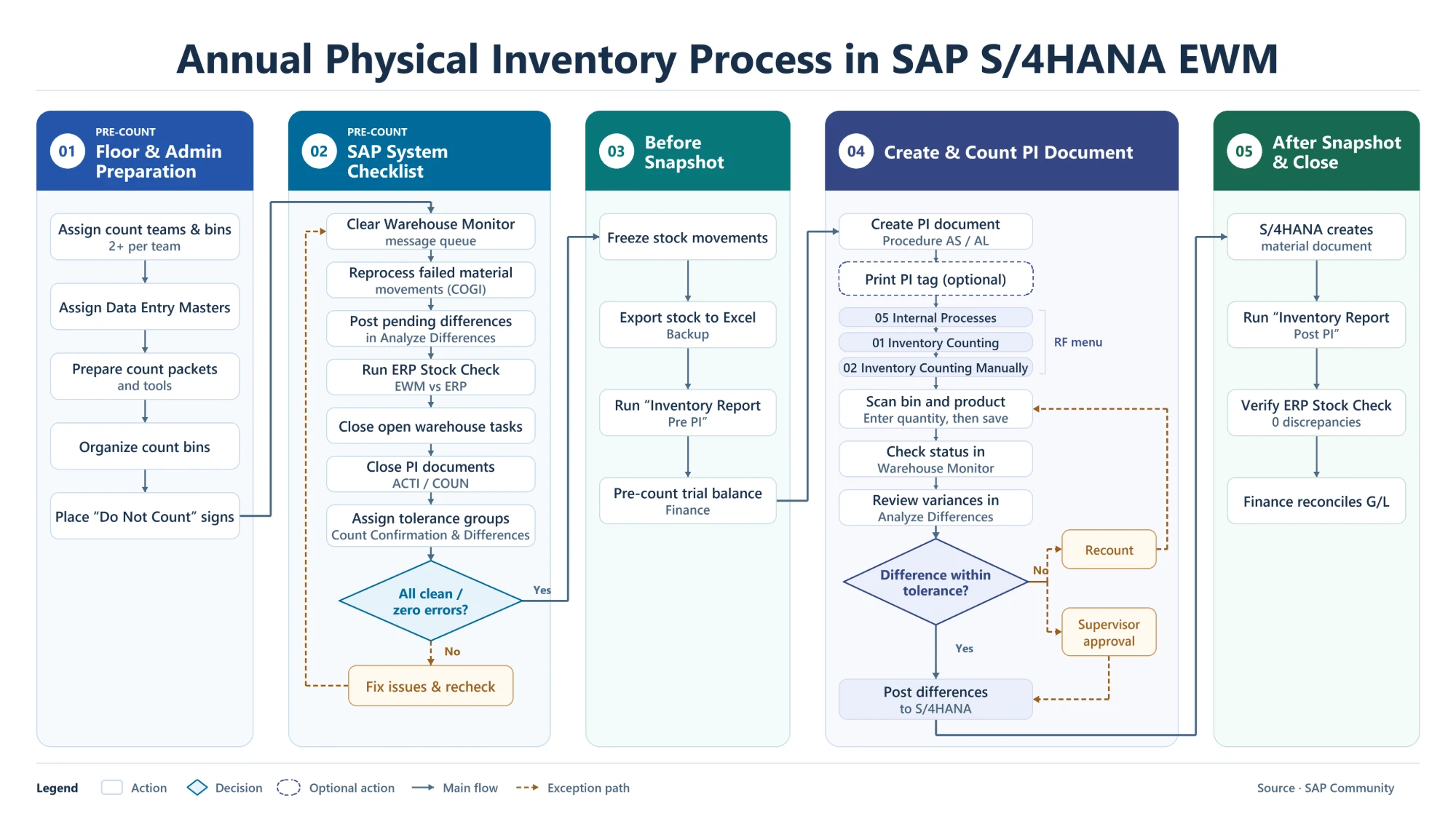
The annual physical inventory in SAP S/4HANA EWM is the fiscal year-end count that confirms the stock on the warehouse floor, the stock in EWM and the stock valued in SAP S/4HANA all agree. The process runs in five phases: two preparation phases, a snapshot before the count, the count itself, and a snapshot and reconciliation after it.
What the Annual Count in EWM Involves
Most of the work happens before anyone counts. The floor and the count teams are organized, the system is cleaned up so nothing is left open, and Finance takes a snapshot of the book values. Only then are the physical inventory (PI) documents created and counted. Differences are checked against tolerances, posted to SAP S/4HANA, and the closing reports give Finance the basis for the G/L reconciliation.
This overview covers the annual, planned count. For the core EWM transactions behind a PI document (create, count, post, clear differences), see SAP EWM Physical Inventory Process Flowchart.
Phase 1: Floor and Admin Preparation
The warehouse defines who counts, where and how:
- Count teams and bins: at least two people per team, each team assigned its own bins.
- Data entry masters: users who key paper counts into SAP, through RF or the count entry app.
- Count packets and tools: bin lists, location maps, count sheets and tags for each team.
- Organized bins: all stock sits in a bin, the same product is grouped together, and stock that is not part of the count carries a “Do Not Count” sign.
Phase 2: SAP System Checklist Before the Count
The system must be clean before PI documents are created, otherwise open items turn into false differences. The checklist:
- Clear the Warehouse Monitor message queue.
- Reprocess failed material movements (COGI).
- Post any pending differences in Analyze Differences.
- Run the ERP Stock Check (EWM vs ERP) and resolve every discrepancy.
- Close open warehouse tasks.
- Close existing PI documents in status ACTI (active) or COUN (counted).
- Assign users to tolerance groups for count confirmation and for difference posting.
If anything is still open, it is fixed and the checklist is run again. The count moves on only when everything is clean, with zero errors.
Phase 3: Before Snapshot
- Freeze stock movements so the book stock stays fixed during the count.
- Export the stock to Excel as a backup.
- Run the “Inventory Report Pre PI”, which lists items, quantities and values before the count.
- Finance prepares the pre-count trial balance.
Phase 4: Create and Count the PI Document
Create the PI Document (Procedure AS / AL)
PI documents for the annual count use procedure AS (annual, product-specific) or AL (annual, bin-specific), so the count is recorded as the annual inventory. Printing a PI tag is optional.
Count Through RF
Counters work on RF devices via 05 Internal Processes → 01 Inventory Counting → 02 Inventory Counting Manually. They scan the bin and the product, enter the quantity and save. The document status is then checked in the Warehouse Monitor.
Review Differences and Apply Tolerances
Variances are reviewed in Analyze Differences. If a difference is within tolerance, it is posted. If not, the bin is either recounted or the difference goes to a supervisor for approval before posting.
Post Differences to SAP S/4HANA
Posting the differences moves them from EWM to SAP S/4HANA, where they update inventory and the G/L.
Phase 5: After Snapshot and Close
- SAP S/4HANA creates a material document for the posted differences.
- Run the “Inventory Report Post PI” as the after snapshot.
- Run the ERP Stock Check again; the target is zero discrepancies.
- Finance reconciles the G/L using the before and after snapshots.
For the same process outside EWM, see SAP MM-IM Physical Inventory Process Flowchart. Scheduled creation of PI documents is covered in Schedule PI Document Creation Process Flow.
Key Apps, Statuses and Procedures
| Item | What it is used for |
|---|---|
| Warehouse Monitor (/SCWM/MON) | Message queue, open warehouse tasks, PI document status |
| Reprocess failed material movements (COGI) | Clear failed goods movements before the count |
| Analyze Differences | Review and post EWM inventory differences to SAP S/4HANA |
| ERP Stock Check | Compare stock in EWM with stock in ERP, before and after the count |
| Assign Tolerance Group – Count Confirmation (/SCWM/PI_USER) | Limits for counters; decides when a recount is needed |
| Assign Tolerance Group – Differences (/SCWM/PI_USER_DIFF) | Posting limits for users who post differences |
| PI procedure AS / AL | Annual count, product-specific / bin-specific |
| PI status ACTI / COUN | Active / counted PI documents to close before the count |
| RF menu 05 → 01 → 02 | Internal Processes → Inventory Counting → Inventory Counting Manually |
Key Takeaways
- Most of the annual count is preparation: floor, teams and a clean system.
- A zero-error checklist (message queue, COGI, Analyze Differences, ERP Stock Check, open tasks, open PI documents) comes before any PI document.
- Before and after snapshots give Finance and auditors a trail from book stock to counted stock.
- Use annual procedures AS or AL so the count is recorded as the annual inventory.
- Differences outside tolerance go to a recount or supervisor approval before they are posted to SAP S/4HANA.