When businesses purchase raw materials or trading goods to stock and sell, they must accurately track costs and record the related journal entries. In SAP, this process typically follows a “Procure to Pay” cycle:
- Purchase Requisition (PR)
- Purchase Order (PO)
- Goods Receipt (GR)
- Invoice Receipt (IR)
- Outgoing Payment
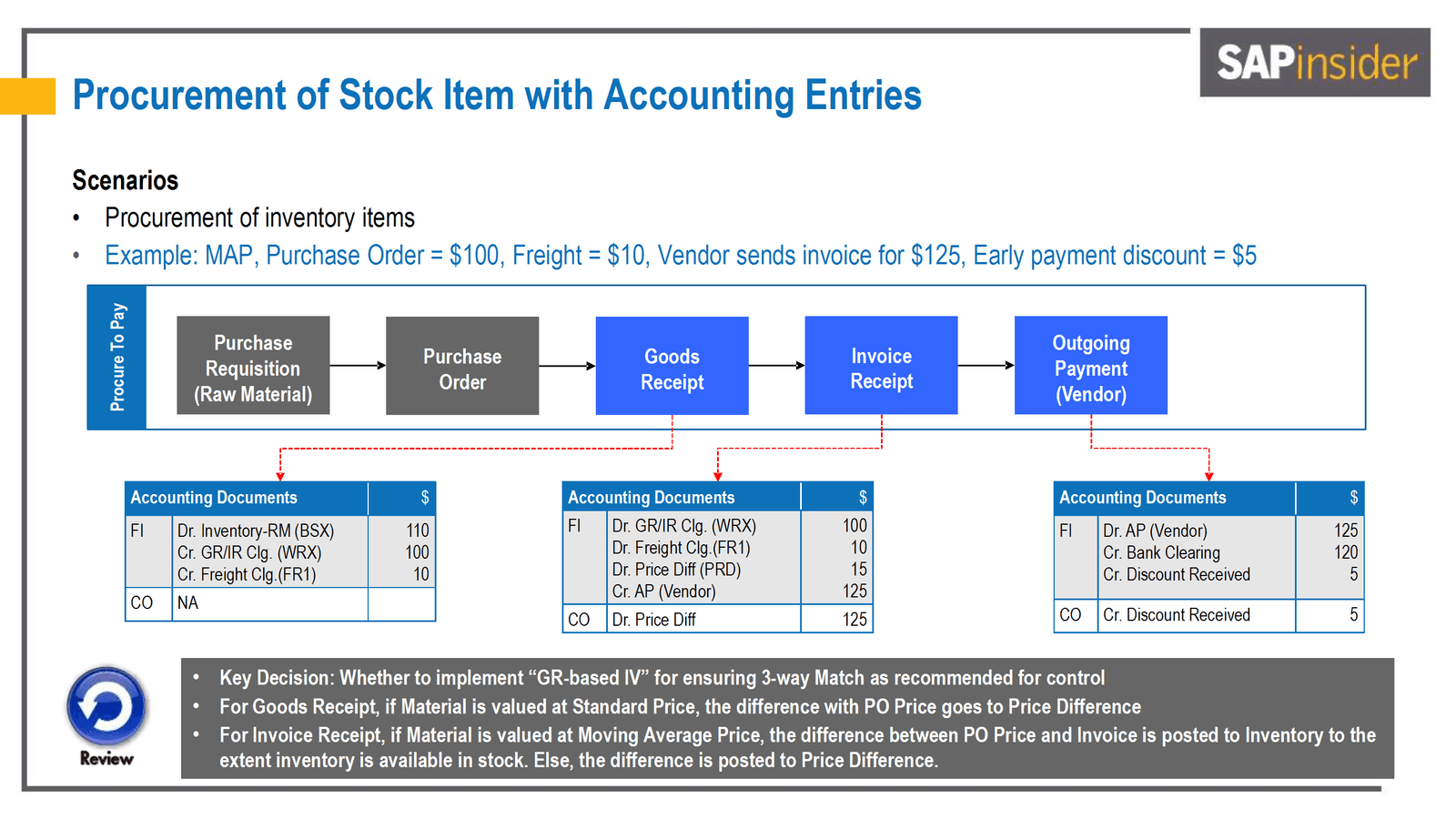
This flow diagram outlines the procurement process within the SAP ERP system, focusing on the accounting entries (financial impact) that occur at each stage. The process begins with the creation of a Purchase Order, followed by Goods Receipt, Invoice Verification, and Payment. Each stage is mapped to specific financial impacts, ensuring the integrity of accounting records while linking them to procurement activities.
Below is an end-to-end perspective of the process, with the accounting entries at each stage.
1. Purchase Requisition (Raw Material) [ME51N]
A department raises a Purchase Requisition to signal the need for stock or materials, using transaction code ME51N.
- A PR does not create any financial (FI) entries.
- It is an internal document used to get approval before a Purchase Order is created.
2. Purchase Order [ME21N]
Once approved, the Purchase Requisition is converted to a Purchase Order with transaction code ME21N. This is the step where freight charges can be included in the same PO while being assigned to a separate vendor (the transportation agent).
Typical example:
- Purchase Order amount: US$100
- Freight cost: US$10
- Total expected cost: US$110
Accounting impact: Normally, creating a PO does not book any direct accounting entries. It is a commitment to purchase rather than an actual financial transaction. However, commitments may be tracked in CO (Controlling) for budgeting purposes.
3. Goods Receipt [MIGO]
Upon the arrival of goods at the warehouse, a Goods Receipt (GR) is recorded using the MIGO transaction. The warehouse personnel enter the received quantity, referencing the original Purchase Order. The system generates accounting entries to reflect the receipt of goods. In our example, we receive stock worth US$110 (including the freight).
Key accounting entries:
- If you value materials at Standard Price (SP), SAP posts the goods at that standard rate, and any difference from the PO price goes to a “Price Difference” variance account.
- If you value materials at Moving Average Price (MAP), the cost of the material is updated (averaged) based on the PO price.
A typical posting when the goods arrive might look like this (assuming Standard Price valuation):
| Debit / Credit | Account | Amount |
|---|---|---|
| Debit (Dr) | Inventory – Raw Material (BSX) | US$110 |
| Credit (Cr) | GR/IR Clearing (WRX) | US$100 |
| Credit (Cr) | Freight Clearing (FR1) | US$10 |
Note:
- GR/IR Clearing (Goods Receipt/Invoice Receipt) is an interim account that tracks the quantity of goods received but not yet invoiced.
- Freight may be captured separately or can be part of the material cost, depending on your configuration.
4. Invoice Receipt [MIRO]
The supplier(s) (material vendor and freight vendor) submit invoices to the Accounts Payable department. The accountant uses the MIRO transaction to process the invoice in relation to the existing Purchase Order.
Example scenario: The vendor sends an invoice for US$125, slightly higher than our expected US$110. This could be due to price or freight differences, or additional surcharges.
Key accounting entries (assuming a variance occurs):
| Debit / Credit | Account | Amount |
|---|---|---|
| Debit (Dr) | GR/IR Clearing (WRX) | US$100 |
| Debit (Dr) | Freight Clearing (if freight was posted separately) | US$10 |
| Debit (Dr) | Price Difference (PRD) | US$15 |
| Credit (Cr) | Accounts Payable (Vendor) | US$125 |
Why a Price Difference (PRD) of US$15? Because the invoice (US$125) exceeds the original expected total of US$110, there is a US$15 difference. Under Standard Price valuation, that difference is booked to a Price Difference account. Under Moving Average Price valuation, the difference might update the inventory value (if enough stock is on hand), or it might still post to PRD if the stock is already consumed or insufficient.
5. Outgoing Payment (Vendor) [F110 or F-53]
When you pay the vendor, you clear the liability on your books. Often, you may receive an early payment discount for prompt payment.
Example scenario: an early payment discount of US$5 applies, so we pay the vendor US$120.
Key accounting entries:
| Debit / Credit | Account | Amount |
|---|---|---|
| Debit (Dr) | Accounts Payable (Vendor) | US$125 |
| Credit (Cr) | Bank Clearing (Outgoing Payment) | US$120 |
| Credit (Cr) | Discount Received | US$5 |
If you captured discounts at the time of invoice, your postings can vary slightly. The concept remains the same: the liability to the vendor is cleared, and you recognize any discount taken.
6. Overview Table: Accounting Impact for Procurement in SAP
| Process Stage | Debit Account | Credit Account | Explanation |
|---|---|---|---|
| Goods Receipt | Inventory (BSX) | GR/IR Clearing (WRX) | Records the addition of stock (excluding freight) and creates a temporary liability for the goods received. |
| Goods Receipt | Freight Clearing Account (FR1) | Records a separate temporary liability specifically for the freight costs associated with the goods received. | |
| Invoice Reversal | GR/IR Clearing (WRX) | Inventory (BSX) | Reverses the goods receipt liability (excluding freight), matching inventory to actual invoice amounts or adjusting for price differences. |
| Invoice Reversal | Freight Clearing Account (FR1) | (Reverses Freight Clearing) | |
| Invoice Posting | Price Difference (PRD) – if applicable | Inventory or P&L Account | Records any difference between the Purchase Order and Invoice prices (debit if the invoice is higher, credit if it is lower). |
| Invoice Posting | Accounts Payable (Vendor – Material) | Recognizes the vendor liability for materials, with freight costs segregated into dedicated vendor processing. | |
| Invoice Posting | Accounts Payable (Vendor – Freight) | Recognizes the vendor liability for freight. | |
| Outgoing Payment | Accounts Payable (Vendor – Material) | Bank Clearing | Finalizes the vendor payment for the material, reducing outstanding payables and reflecting the cash movement from the bank account. |
| Outgoing Payment | Accounts Payable (Vendor – Freight) | Bank Clearing | Finalizes the vendor payment for the freight costs, reducing outstanding payables and reflecting the cash movement from the bank account. |
7. Conclusion
This streamlined overview of the procurement-to-pay process illustrates how each step triggers specific accounting entries in SAP. Understanding these postings is crucial for maintaining clean financials, ensuring proper cost allocation, and upholding strong internal controls. By carefully setting up your valuation (Standard Price vs. MAP), GR-based invoice verification, and the handling of freight and discounts, you can ensure that your inventory and financial records accurately reflect your purchasing activities.
Whether you’re new to SAP procurement or looking to refine your company’s processes, transparency and consistency at each step is the best way to avoid errors and disputes.